


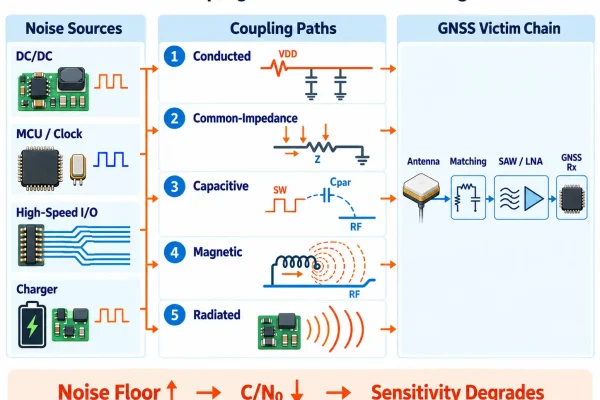

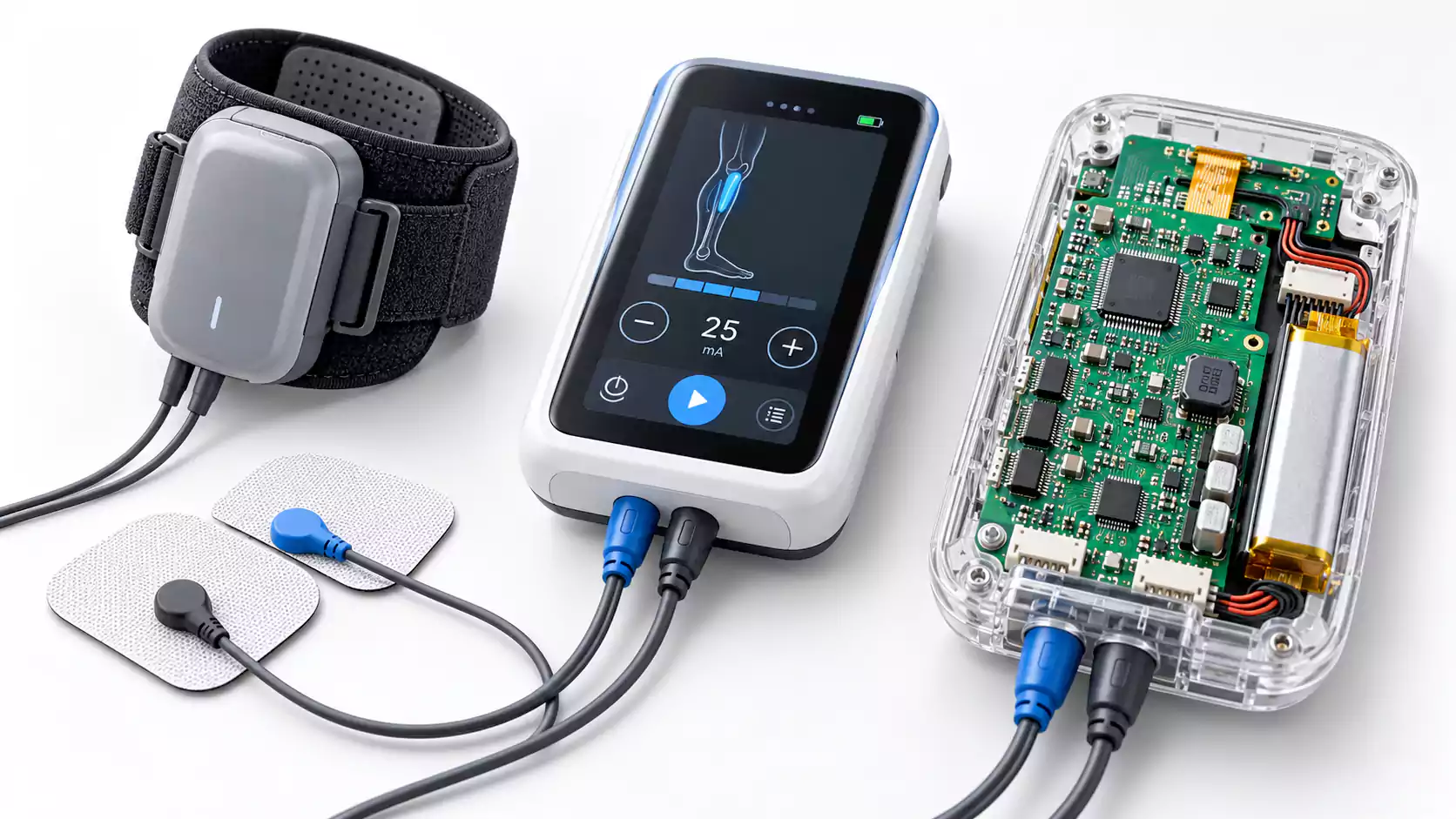

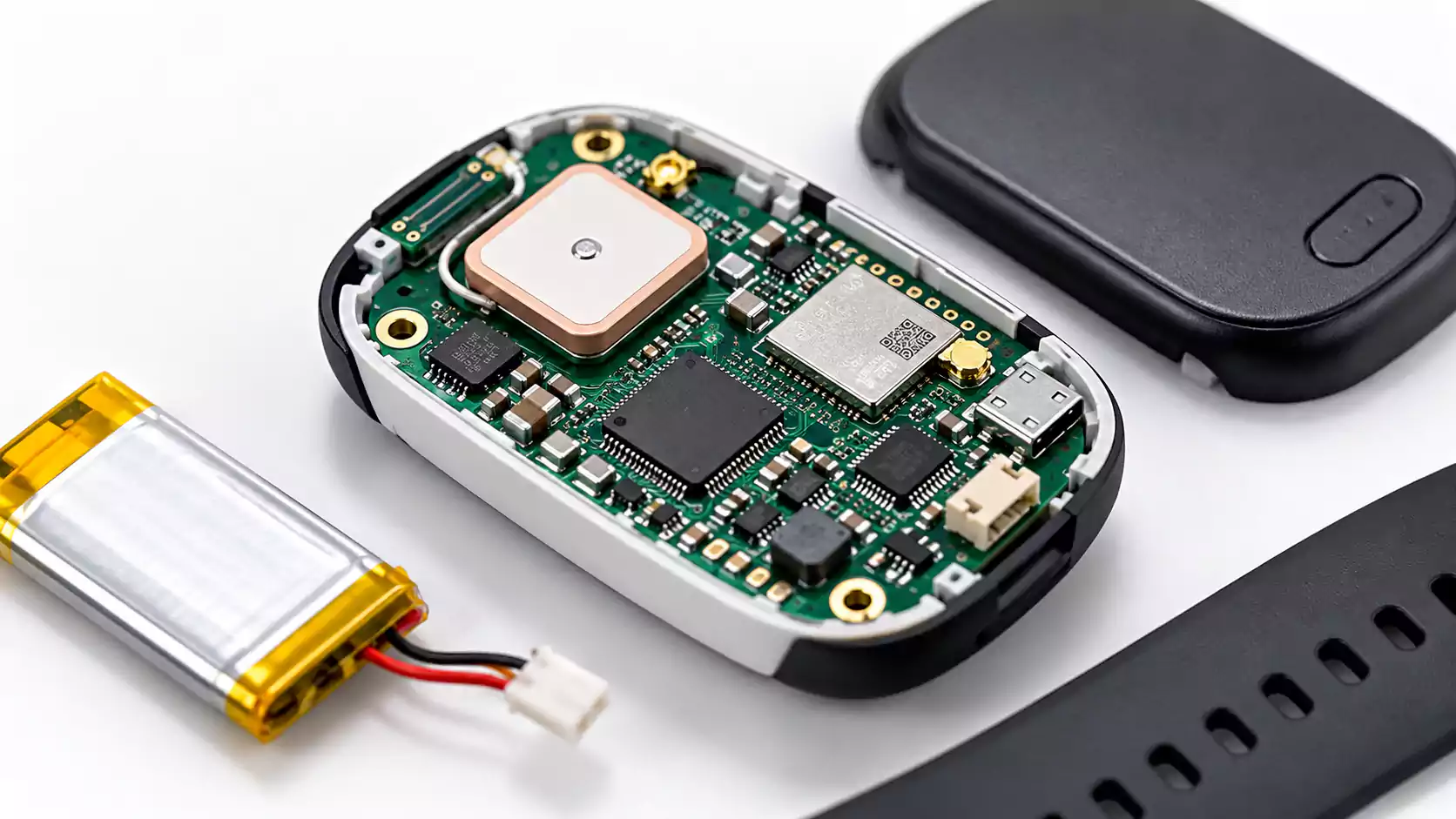

A GNSS receiver may perform well on an evaluation board but lose sensitivity after integration into the final product. Common signs include lower C/N?, fewer tracked satellites, longer time to first fix, or unstable positioning—especially when a DC/DC converter, charger, display, camera, or high-speed interface becomes active.
In many cases, the antenna is not the main problem. The receiver is being desensitized by noise generated elsewhere on the PCB.
The key engineering questions are straightforward: where is the noise coming from, how is it coupling into the GNSS front end, and what layout or power changes will stop it?
How to Recognize GNSS Desense
GNSS interference is unwanted noise or signal energy entering the receiver, while desense is the resulting reduction in receiver sensitivity.
In practice, GNSS desense often becomes visible when receiver performance changes as another subsystem turns on, changes load, or switches operating mode.
| Observation | Likely Cause |
|---|---|
| C/N? drops when the DC/DC converter turns on | Switching noise or power coupling |
| Satellite count falls during charging | Charger noise or shared power-rail coupling |
| GNSS degrades when the display or camera starts | Digital clock or interface noise |
| GNSS improves with a clean external supply | Conducted power noise |
| Moving the antenna away improves reception | Radiated or near-field coupling |
| Changing the switching frequency changes the interference | Converter harmonics or switching-node ringing |
A receiver may still maintain a position fix while its C/N? and sensitivity have already degraded, so C/N?, satellite count, and TTFF are generally more useful indicators of desense than fix status alone.
How MHz Switching Noise Reaches a GHz GNSS Receiver
A buck converter switching at 1–3 MHz can still affect a GNSS receiver operating around 1.5 GHz because the converter does not generate energy only at its switching frequency.
Fast voltage and current transitions create harmonics that extend far above the fundamental. PCB and package parasitics can also produce high-frequency ringing.
The interference path is typically:
Fast switching edges
→ harmonics and ringing
→ PCB coupling
→ higher GNSS noise floor
→ lower C/N? and receiver sensitivity
High-speed digital circuits behave in a similar way. MCU clocks, DDR, USB, Ethernet, and MIPI interfaces may operate below the GNSS band, but their fast edges can still generate high-frequency noise.
For GNSS PCB design, the important factors are edge rate, loop area, parasitic coupling, and return-current paths, not just the nominal switching or clock frequency.
Where the Noise Usually Comes From
Most onboard GNSS self-interference comes from three areas.
Switching Power Circuits
Typical sources include:
- DC/DC converters
- Battery chargers
- LED drivers
- Motor drivers
The main noise structures are the high-dv/dt switch node, the high-di/dt hot loop, and the switching inductor.
High-Speed Digital Circuits
MCU and processor clocks, DDR, USB, Ethernet, MIPI, and camera interfaces can generate harmonic and common-mode noise that couples into the RF section.
Wireless Transmitters
Cellular, Wi-Fi, and Bluetooth radios can reduce GNSS sensitivity through harmonics, receiver blocking, near-field coupling, or shared power paths. In products that integrate several radios on one board, these problems are closely related to multi-radio coexistence PCB design, where antenna isolation, filtering, power integrity, and concurrent-radio behavior need to be considered together.
For many mixed-signal GNSS designs, switching power and high-speed digital activity are the most practical places to begin troubleshooting.
Five PCB Coupling Paths That Cause GNSS Desense
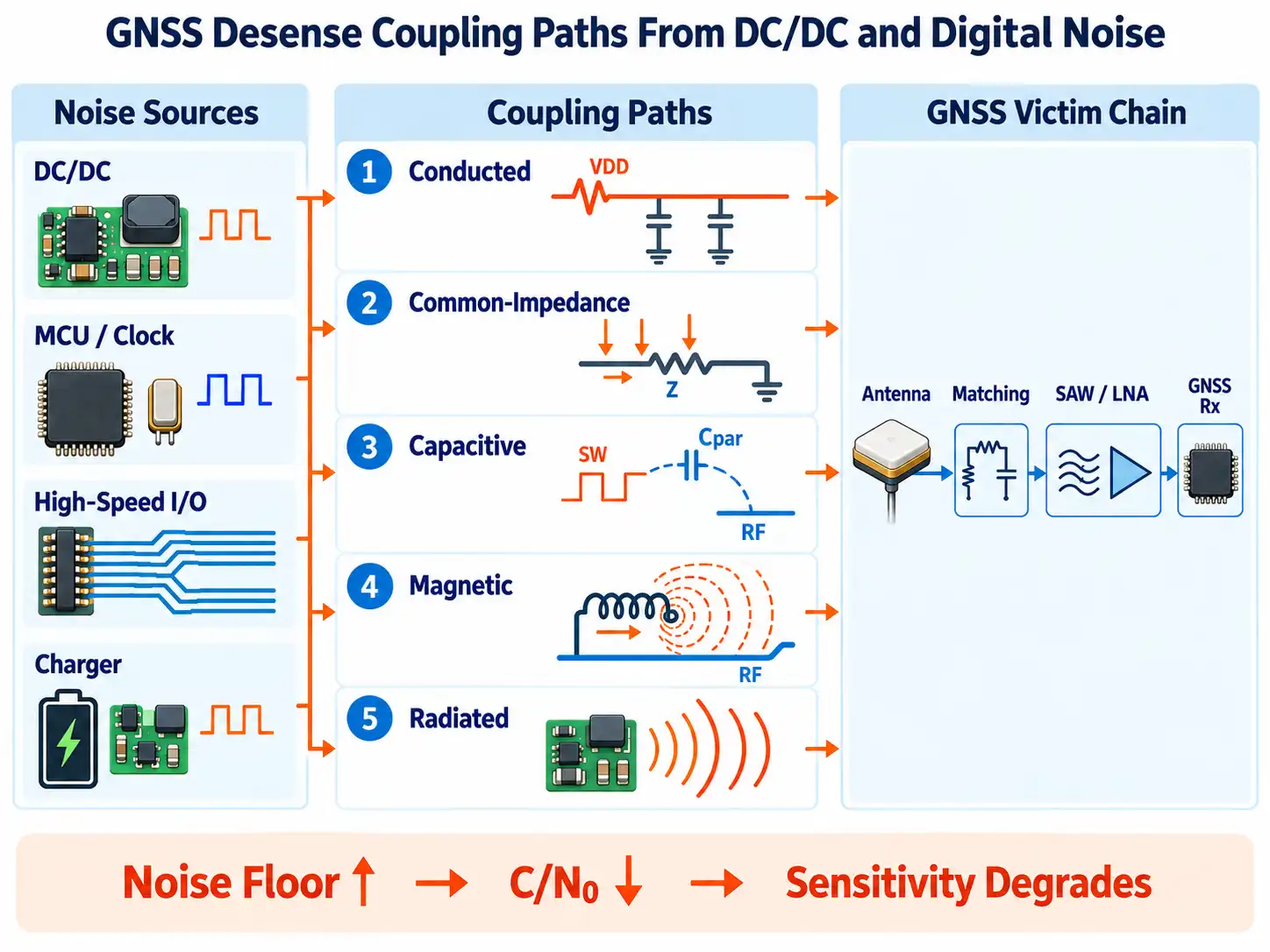
Once a noise source is identified, the next step is to understand how that noise reaches the receiver.
A useful model is:
Source → Coupling Path → Victim
1. Conducted Coupling
Noise can travel through a shared power rail:
DC/DC converter → power rail → GNSS IC or LNA
Local decoupling, ferrite or LC filtering, rail isolation, and cleaner local regulation can reduce this path.
The LNA supply and filter placement also influence how well the RF front end preserves weak signals. These tradeoffs are covered in more detail in LNA PCB design for RF front ends.
2. Common-Impedance Coupling
Power and digital return currents may share part of the same return structure used by the RF section.
The voltage developed across that shared impedance can disturb the GNSS reference even when the circuits appear separated on the schematic. The key issue is where current actually flows through the PCB.
3. Capacitive Coupling
A high-dv/dt switch node can couple through parasitic capacitance into nearby conductors:
SW node → parasitic capacitance → RF trace or antenna structure
A larger SW-node copper area can increase this coupling, so the area should be limited to what is needed for electrical and thermal performance.
4. Magnetic Coupling
High-di/dt current loops and switching inductors generate magnetic fields.
If the converter hot loop or inductor is close to the GNSS section, energy can couple into nearby RF components, loops, or antenna structures. Reducing loop area and improving placement are usually more effective than adding filtering after the coupling has already occurred.
5. Radiated Coupling
Clock traces, switching nodes, cables, and high-speed connectors can radiate noise into the GNSS antenna.
This is particularly relevant when the antenna and noisy digital or power circuitry are located on the same PCB.
PCB Layout Rules That Reduce GNSS Desense
Effective isolation comes from three things: reducing the noise source, weakening the coupling path, and protecting the GNSS front end.
Keep the GNSS RF Chain Compact
A typical RF path is:
Antenna → Matching Network → SAW Filter / LNA → GNSS Receiver
Keeping this path short and physically separated from noisy power and digital circuitry helps reduce unwanted coupling.
Active antennas, bias tees, SAW filters, LNAs, connector launches, and 50Ω routing are part of the same signal chain; these topics are covered more deeply in the guide to GNSS receiver PCB design.
Minimize the DC/DC Hot Loop
The main switching loop should be physically compact.
Key layout areas include:
- Input capacitor placement
- Switching MOSFET current path
- SW-node geometry
- Inductor placement
Analog Devices identifies the switched-current hot loop as a major EMI source in switch-mode regulators and notes that its radiating effect depends strongly on switched current and loop area.
A smaller hot loop reduces magnetic-field strength and radiated EMI.
Control the SW-Node Area
The switch node is a high-dv/dt region that can couple capacitively into nearby structures.
Keeping the SW-node copper controlled helps reduce electric-field coupling while still meeting electrical and thermal requirements.
Separate the Inductor From the RF Front End
The switching inductor is best positioned away from:
- The GNSS antenna
- Matching components
- RF feed lines
- LNA input circuitry
This becomes increasingly important as switching current rises.
Route High-Speed Digital Signals Away From the GNSS Zone
Clocks, memory buses, Ethernet, USB, and camera interfaces can generate broadband noise and harmonics.
Routing these signals away from the GNSS RF section, while maintaining clear return-current paths, helps reduce both direct and common-mode coupling.
Ground and Return-Path Control
Separating RF and digital ground planes can sometimes increase GNSS interference if high-frequency return currents are forced around a gap.
When a signal crosses a split reference plane, the return path becomes longer:
Longer return path → larger loop area → stronger radiation and coupling
Texas Instruments describes the same split reference plane problem in its high-speed layout guidance: routing across a plane split forces the high-frequency return current around the gap, increasing loop area and the risk of radiated emissions.
For many GNSS mixed-signal boards, a cleaner approach is to use a continuous reference plane and control noise through placement and current paths:
- Keep switching loops local.
- Separate RF, digital, and power sections through placement.
- Keep noisy return currents away from the GNSS RF area.
- Maintain a continuous reference beneath high-frequency traces.
The main objective is controlled return-current flow, rather than simply drawing separate ground regions.
Match the Filter to the Coupling Path
Power filtering is most effective when the interference enters through the supply network.
| Interference Path | Typical Response |
|---|---|
| Noise on the GNSS supply rail | Local decoupling, ferrite, or LC filter |
| DC/DC ripple on a shared rail | Filtering or cleaner local regulation |
| SW-node radiation into the antenna | Improve layout and physical isolation |
| Magnetic coupling from the inductor | Reduce loop area and improve placement |
| Digital clock radiation | Improve routing and return paths |
An LDO or filter can reduce conducted noise, but radiated and magnetic coupling generally require changes to PCB geometry.
How to Debug GNSS Desense
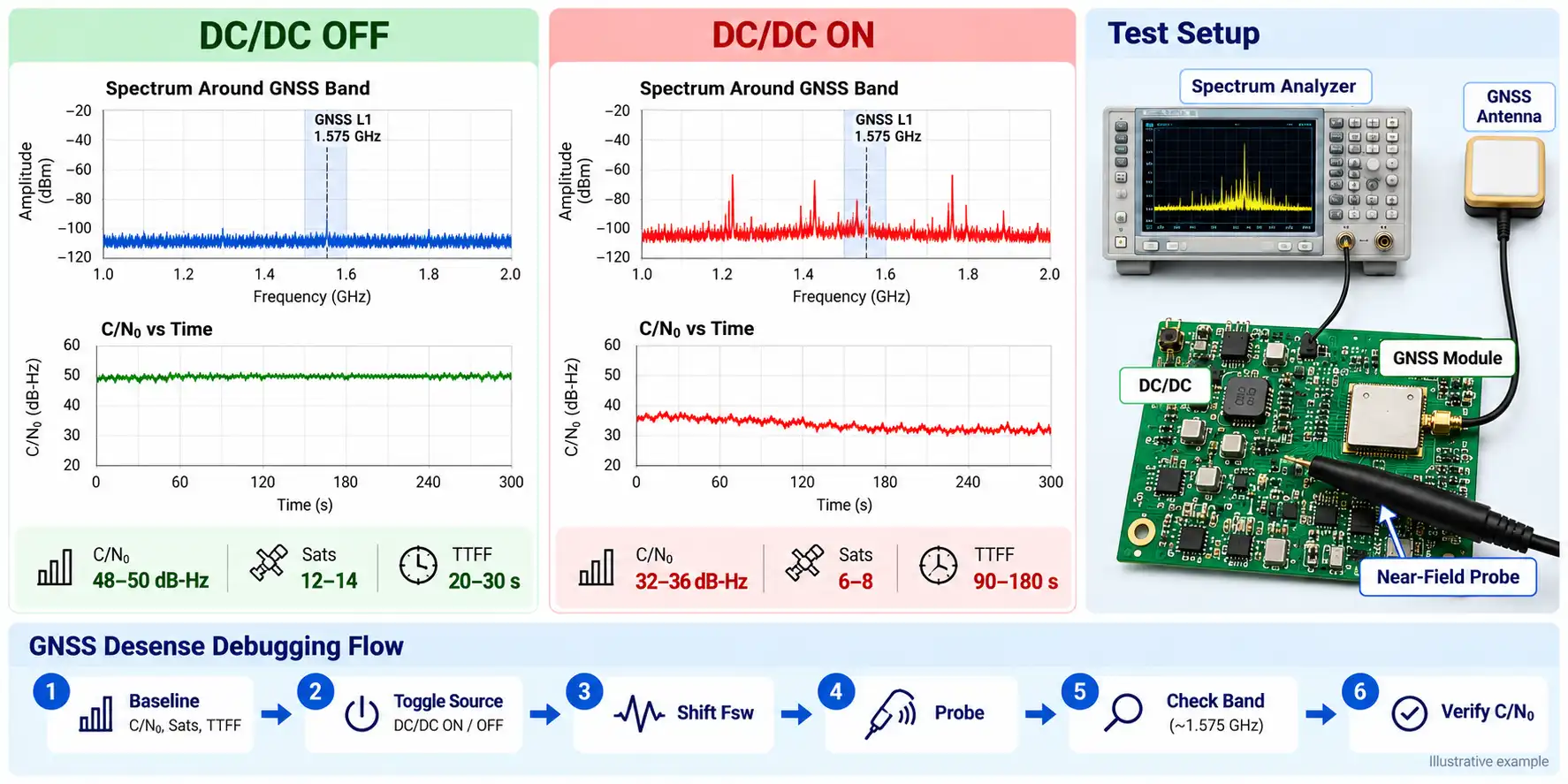
A structured A/B test is usually the fastest way to identify the dominant noise source.
1. Establish a Baseline
Keep the antenna, board orientation, test location, and receiver configuration consistent.
Record:
- C/N?
- Tracked satellite count
- TTFF
2. Change One Noise Source at a Time
Switch major subsystems on and off, such as:
- DC/DC converter
- Battery charger
- Camera or display
- Ethernet or another high-speed interface
A repeatable change in C/N? helps identify which subsystem is contributing to the desense.
3. Test With a Clean External Supply
Powering the GNSS section from a clean bench supply can help separate supply-related interference from radiated coupling.
A clear improvement points toward areas such as converter noise, shared supply impedance, insufficient filtering, or ground-current coupling.
4. Shift the Switching or Clock Frequency
Changing the DC/DC switching frequency is a useful diagnostic test.
If the interference spectrum or GNSS performance changes with the switching frequency, the regulator is likely contributing to the problem.
The same method can be applied to MCU or interface clocks.
5. Use Near-Field Probes
Near-field probing can help locate the physical source.
E-field probes are useful around:
- SW nodes
- Clock traces
H-field probes are useful around:
- Converter hot loops
- Inductors
- High-current return paths
6. Check the GNSS Band
A spectrum analyzer can reveal:
- Spurs near the GNSS band
- Elevated broadband noise
- Spectral changes as subsystems switch states
This helps connect a specific PCB structure or subsystem to the observed receiver desense.
Verify the Improvement With C/N?
After changing the layout or power architecture, repeat the same operating-state tests used during debugging.
A simple verification flow is:
Baseline → Noise Source Active → Design Change → C/N? Recovery
Track at least:
- C/N?
- Satellite count
- TTFF
Validation is most meaningful under realistic operating conditions, such as charging, high processor load, an active display or camera, and high-speed communications.
For production hardware, repeating the same tests across pilot and volume builds can also reveal changes caused by component substitutions, stackup variation, shielding, or assembly.
Conclusion
GNSS desense is easier to diagnose when it is treated as a source–coupling path–victim problem rather than simply an antenna problem.
A practical workflow is to identify the noise source, determine how it reaches the GNSS front end, correct the PCB layout or power architecture, and verify the improvement with C/N? and controlled A/B testing.
For GNSS, RF, IoT, and mixed-signal hardware moving from prototype to production, MULTIPCB supports controlled-impedance PCB fabrication and PCBA for RF, multilayer, and mixed-signal designs.
