

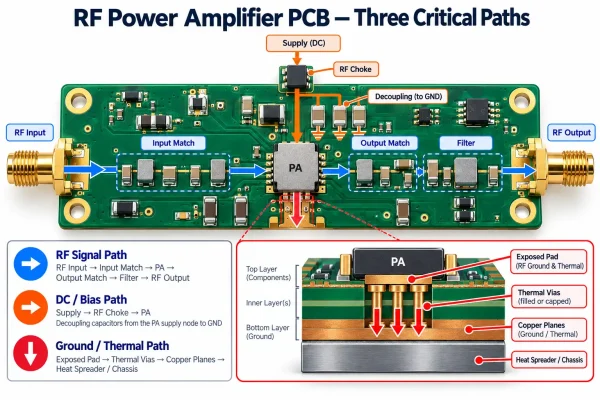



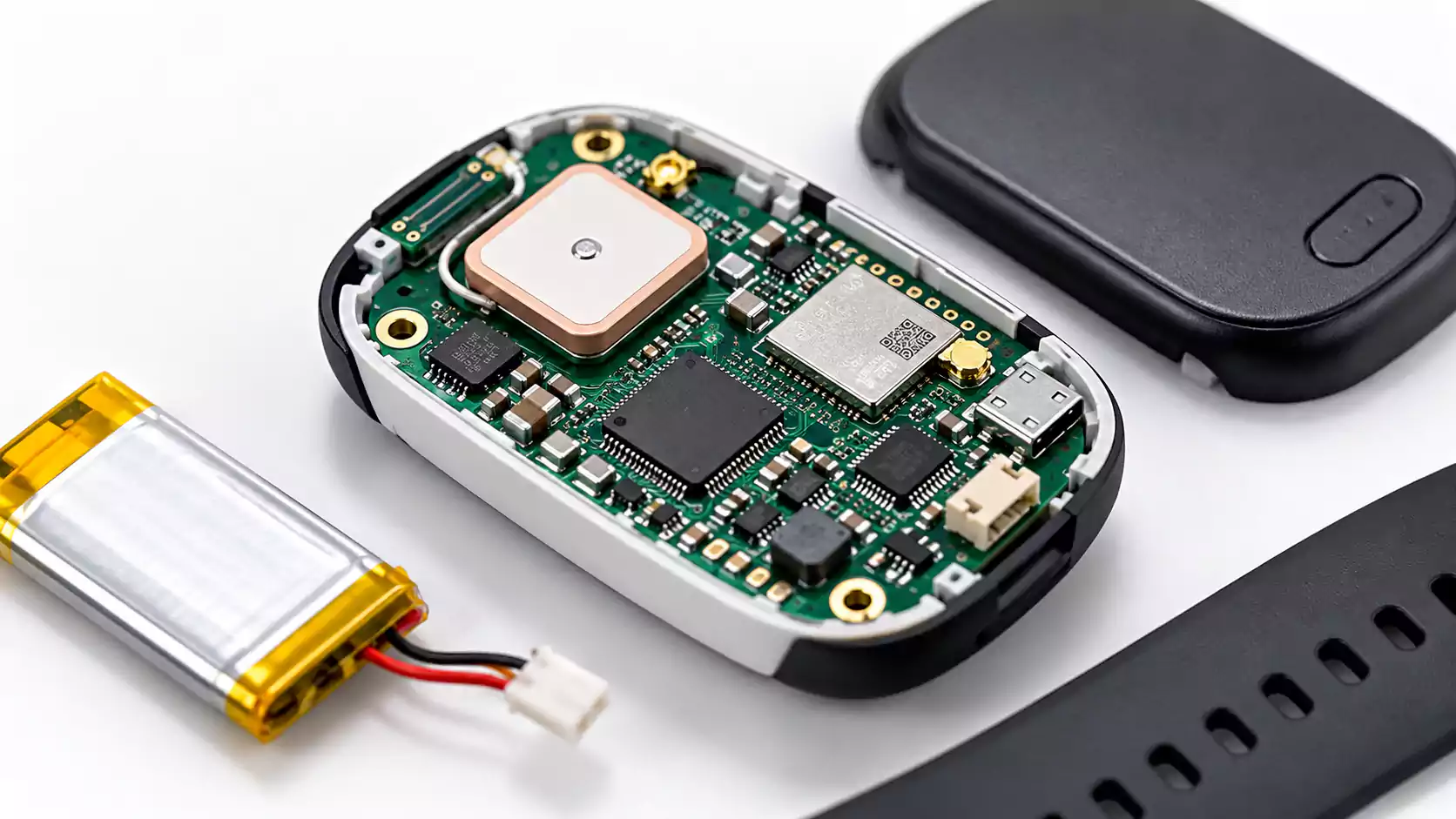

RF Power Amplifier PCB Design brings RF performance, power delivery, grounding, and heat dissipation together on the same board. A PA that works well on an evaluation board may behave differently on a custom PCB if the matching network, bias path, grounding, or thermal structure changes.
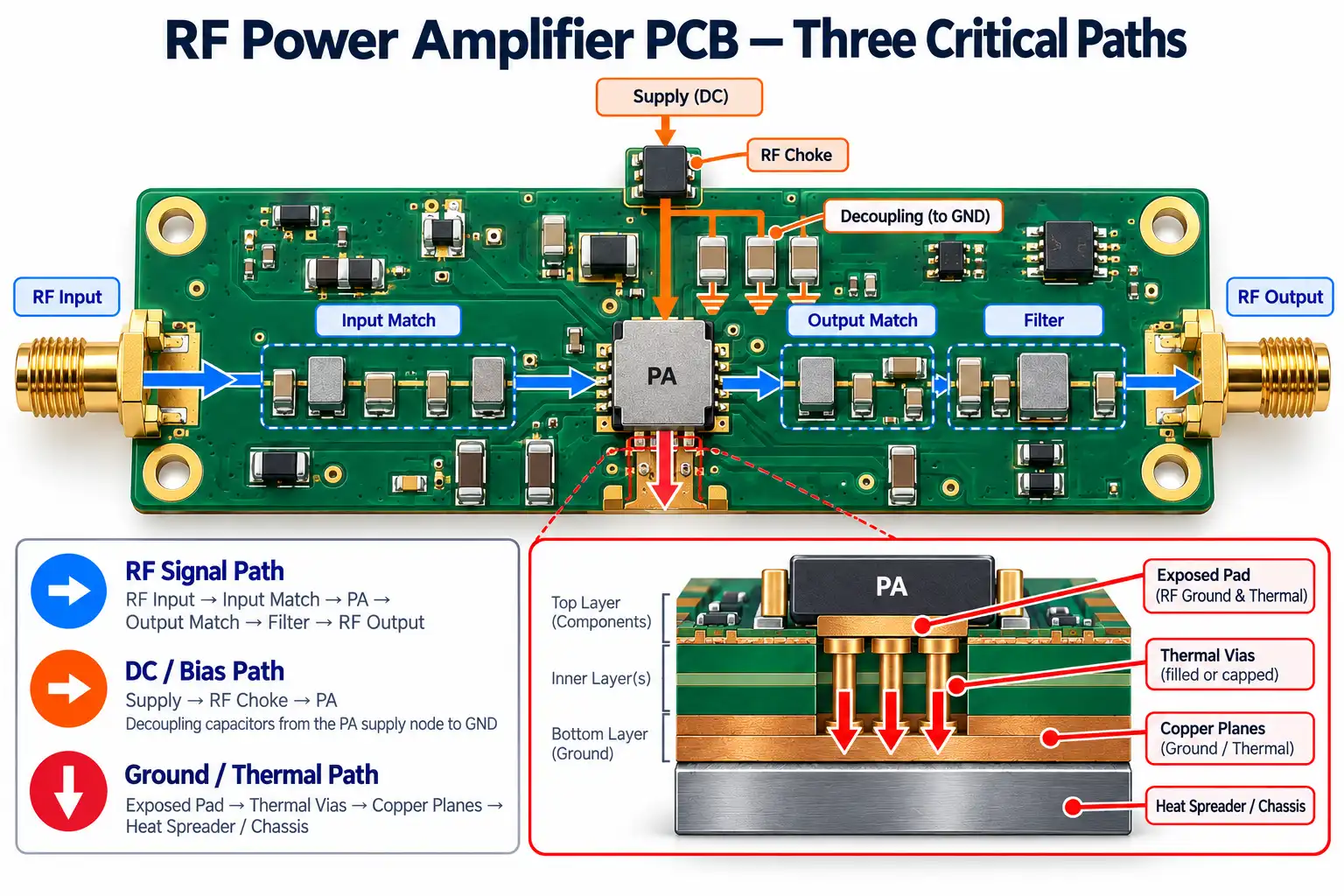
Most layout-related problems can be traced to three areas:
| RF signal path | Mismatch, insertion loss, reduced gain or output power |
| DC/bias path | Supply noise, bias instability, RF coupling into power rails |
| Ground / thermal path | Feedback, ground inductance, excessive junction temperature |
A reliable RF power amplifier PCB depends on keeping these three paths controlled from layout through fabrication, assembly, and testing.
RF PA Matching Network PCB Layout
In an RF power amplifier PCB, the system interface is usually 50Ω, while the PA device may need a different source or load impedance for best performance. The PA matching network transforms the device impedance to the system impedance.
PCB geometry directly affects that match. Trace length, pad size, ground vias, solder, and component placement all add parasitic inductance or capacitance.
Keep the Matching Network Compact
For both input and output matching:
- Place matching components close to the PA.
- Keep shunt ground paths short.
- Minimize unnecessary vias and transitions.
- Treat pads, neck-downs, and vias as part of the RF network.
- Leave tuning positions on prototypes when adjustment may be needed.
The external RF path can then transition into controlled-impedance microstrip or grounded coplanar waveguide leading to an SMA, U.FL, or similar connector. For production boards, controlled-impedance PCB design also depends on finished trace geometry, dielectric thickness, copper thickness, and the reference plane.
Connector pad geometry and nearby ground placement also affect impedance continuity.
The key point is that 50Ω usually applies to the RF interface, while the impedance inside the PA matching network is set by the device and matching design.
How to Prevent RF Power Amplifier Oscillation
RF power amplifier oscillation usually comes from unintended feedback between the output, input, ground, or bias network.
Because the PA output is much stronger than the input, even small amounts of coupling can affect stability.
Keep the RF Path Directional
A clean layout keeps the signal flow simple:
RF Input → Input Match → PA → Output Match → Filter → RF Output
Physically separate the input and output matching sections, and minimize long parallel runs between them.
Control RF Coupling With Grounding
Ground via fences can help contain RF fields, especially around grounded coplanar structures. They work best with a continuous ground plane and good separation between sensitive RF sections.
These practices are also consistent with Analog Devices' RF PCB grounding and via-fence guidelines, which emphasize low-inductance ground connections and continuous RF return paths.
Minimize Shared Ground Impedance
PA output current flowing through a shared inductive ground path can couple noise back into the input or bias circuitry.
Short, low-inductance ground connections help reduce this feedback and improve stability.
Stabilize the Bias Network
The bias path can also carry RF energy back into the amplifier. RF chokes, local decoupling, and supply filtering help isolate the PA from the power network.
Shielding can further reduce radiated coupling, but stable operation mainly depends on good floorplanning, grounding, and bias design.
PA Bias Network, RF Chokes, and Decoupling
The bias network supplies DC power to the PA while isolating the RF signal from the power rail.
An RF choke is commonly used in this path. Key selection factors include:
| Current rating | Supports the PA supply current |
| DC resistance | Affects voltage drop and power loss |
| Q factor | Influences RF loss |
| Self-resonant frequency | Defines the useful operating range |
| Parasitic capacitance | Can create an unwanted RF path |
The RF choke PCB layout should keep the RF node short and compact, with clear separation from switching power circuitry.
Decoupling Depends on the Physical Layout
A bypass capacitor works together with its pads, traces, vias, and ground connection. These elements determine the high-frequency impedance the PA sees.
High-frequency decoupling capacitors should sit close to the PA supply pin with short connections to ground. You can place larger bulk capacitors farther upstream to support lower-frequency current demand.
The final decoupling network depends on capacitor ESL and ESR, PCB geometry, operating frequency, and power-path impedance.
Place switching regulators away from sensitive PA input, matching, and bias sections to reduce noise coupling.
Grounding and RF PA Thermal Management
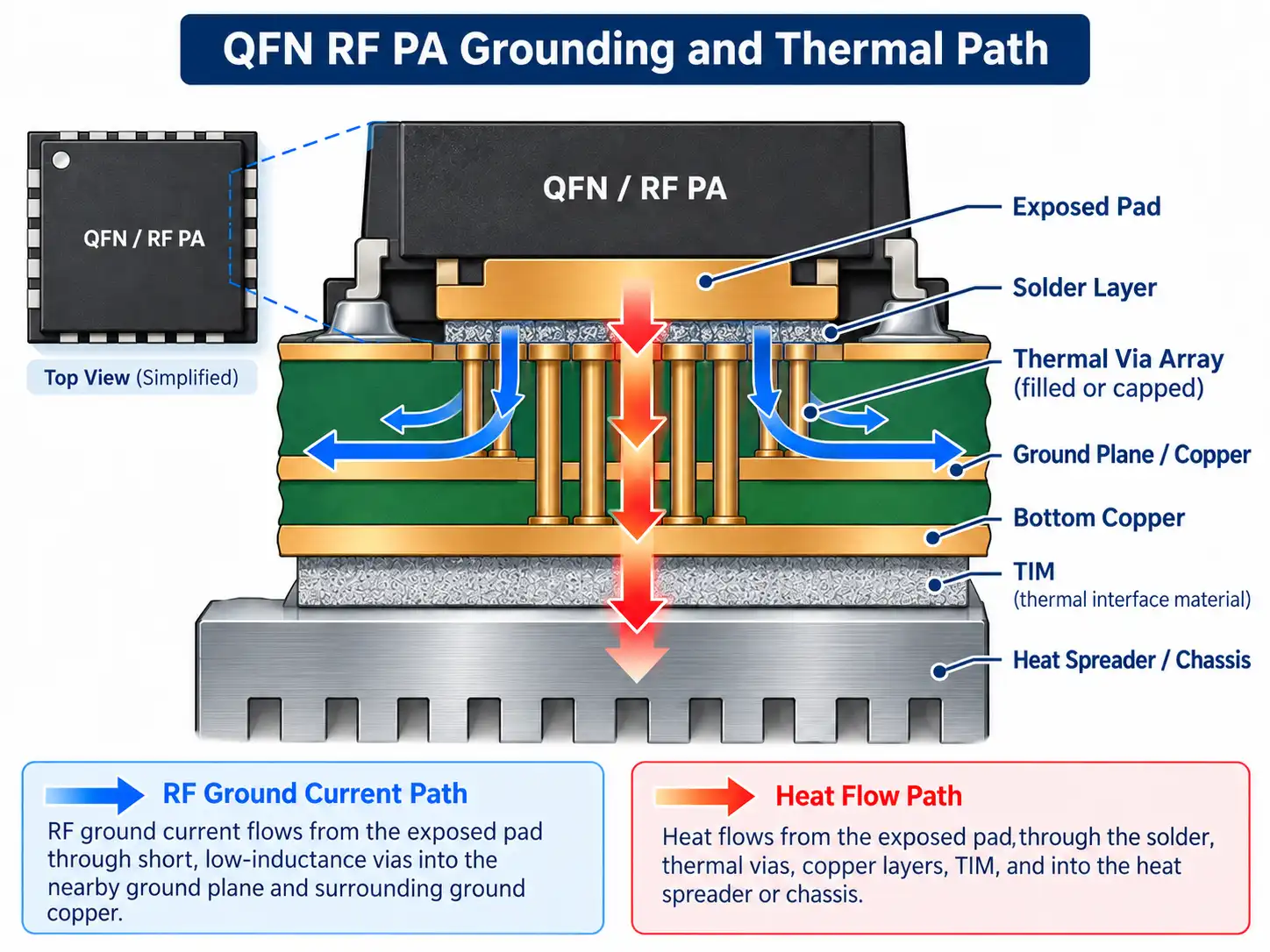
For many QFN, LGA, and MMIC power amplifiers, the exposed pad serves two functions: RF grounding and heat transfer. Both should be designed together.
Keep the Ground Path Short
Connect the PA to a continuous ground reference through short, low-inductance paths.
Shunt matching and decoupling components also need direct ground connections. Long traces or distant vias add inductance and can change RF behavior even when the schematic values are correct.
Build a Complete Thermal Path
PA thermal vias move heat from the package into internal and backside copper, but their performance depends on where that heat goes next.
A typical heat path is:
PA Junction → Package → Exposed Pad → Solder → PCB Copper/Vias → Heat Spreader → TIM → Chassis or Heat Sink
For packaged RF amplifiers, this PCB-based heat path also makes RF amplifier junction temperature and thermal reliability important considerations during board design.
For higher power density, the PCB may also use:
- larger copper areas,
- thicker copper,
- heat spreaders,
- copper inlays,
- metal-backed structures,
- direct conduction to the enclosure.
Via-in-pad designs also require proper solder and stencil control. Filled or filled-and-capped vias can improve assembly consistency when the package and thermal requirements justify the added process.
The main design goal is to create a low-inductance RF ground and a continuous heat path from the PA package to the final cooling structure.
From CAD to Real Board: Why PA Performance Changes After Manufacturing
RF simulations use defined geometry and material values, while the finished PCB introduces manufacturing variation that can shift PA matching and loss.
Key PCB Variables
| Trace width | Changes impedance and matching |
| Dielectric thickness / Dk | Shifts impedance and electrical length |
| Copper thickness/roughness | Affects conductor loss |
| Via geometry | Adds parasitic inductance and capacitance |
Material choice also affects RF consistency. FR4 can work for short RF paths with moderate loss requirements, while high-frequency PCB materials and stackups become more useful when insertion loss, Dk stability, or matching accuracy are more critical.
Hybrid stackups can combine RF laminate and FR4 to balance performance and cost.
SMT Assembly Effects
Small matching components are sensitive to placement, pad geometry, and solder volume. QFN and MMIC assembly can also affect RF grounding, thermal contact, and exposed-pad solder quality.
In practice, the finished PCB and assembly define the final RF performance. Manufacturing and soldering tolerances can shift even a well-designed layout's behavior.
Consistent production depends on controlling the stackup, critical RF geometry, component placement, and soldering process.
RF Power Amplifier PCB Bring-Up and Testing
A structured bring-up process makes it easier to verify the PA and isolate RF, bias, thermal, or assembly issues.
- Inspect the assembly. Check the PA package, matching components, and exposed-pad soldering. Use X-ray when needed.
- Check resistance and shorts. Verify the supply and bias rails before power-up.
- Apply current-limited power. Confirm quiescent current and bias voltages.
- Start with a low RF input level. Verify basic amplifier operation before increasing drive.
- Measure gain and matching. Compare the results with the expected design data.
- Increase RF drive gradually. Measure output power and compression, including P1dB where relevant.
- Check efficiency and spectrum. Measure PAE, harmonics, and spurious output. Modulated systems may also require EVM, ACPR/ACLR, or IMD.
- Check thermal behavior. Use a thermal camera or temperature sensor to identify hotspots and confirm heat spreading.
PAE is commonly expressed as:
A lower-than-expected PAE may indicate output mismatch, RF path loss, bias issues, or excessive operating temperature.
Common RF PA PCB Problems
| Low gain | Input/output mismatch or excess RF loss | Matching network |
| Low output power | Output mismatch, trace loss, or supply drop | Output network and VDD |
| High supply current | Oscillation or incorrect bias | Spectrum and bias current |
| PA oscillation | Output-to-input coupling or shared ground impedance | Isolation and grounding |
| PA overheating | Low efficiency or weak thermal path | EPAD-to-chassis heat path |
| High harmonics | Output matching or filter issue | Output network |
| Performance shifts after assembly | Placement, solder, or package parasitics | PCBA inspection |
| Production units vary | Stackup, Dk, etch, or SMT variation | Manufacturing data |
| Evaluation board works, custom PCB does not | Layout differs from the reference design | Matching, grounding, and bias network |
Conclusion
Reliable RF Power Amplifier PCB Design depends on controlling more than the RF trace. The matching network, input-output isolation, bias path, grounding, heat-removal path, fabrication tolerances, and SMT assembly all influence the final amplifier performance.
The most useful design approach is to follow the complete system:
RF path → bias path → ground/thermal path → manufactured board → RF validation.
For RF amplifier and wireless hardware projects, MULTIPCB provides RF and microwave PCB fabrication and PCBA support for controlled-impedance and high-frequency designs, from prototype builds through production.
