




A low-noise amplifier and SAW filter may perform well on paper, but receiver performance can change significantly once integrated onto a PCB.
In LNA PCB design, trace loss, matching-network parasitics, grounding, supply noise, and filter coupling all influence the final noise figure, gain, stability, and rejection.
A typical RF front-end PCB design follows this signal path:
RF Input → ESD Protection → SAW Filter / LNA → Matching Network → LNA / SAW Filter → Receiver
Good performance depends on managing the entire RF path as a single system—from component order and 50Ω routing to grounding, power integrity, and manufacturing tolerances.
Pre-LNA Loss Directly Affects Receiver Noise
Loss ahead of the first LNA strongly affects overall receiver noise performance because it reduces the signal before any meaningful gain is added.
That loss can come from several parts of the front end:
- RF connectors
- PCB traces
- ESD protection
- RF switches
- SAW filter insertion loss
These losses reduce the signal before amplification and therefore increase the cascaded receiver noise figure.
As a result, the front-end architecture should balance sensitivity against blocker rejection.
| Receiver Requirement | PCB / Architecture Impact |
|---|---|
| Lowest possible NF | Keep pre-LNA loss low |
| Strong blockers | Use filtering ahead of the LNA |
| High LNA gain | Improve input-to-output isolation |
| Limited IIP3 / P1dB | Attenuate strong out-of-band signals early |
| Wide bandwidth | Manage matching and PCB parasitics carefully |
The practical goal is to preserve as much signal as possible before the first gain stage while providing enough filtering to keep strong out-of-band signals from degrading receiver performance.
SAW Filter Before or After the LNA?
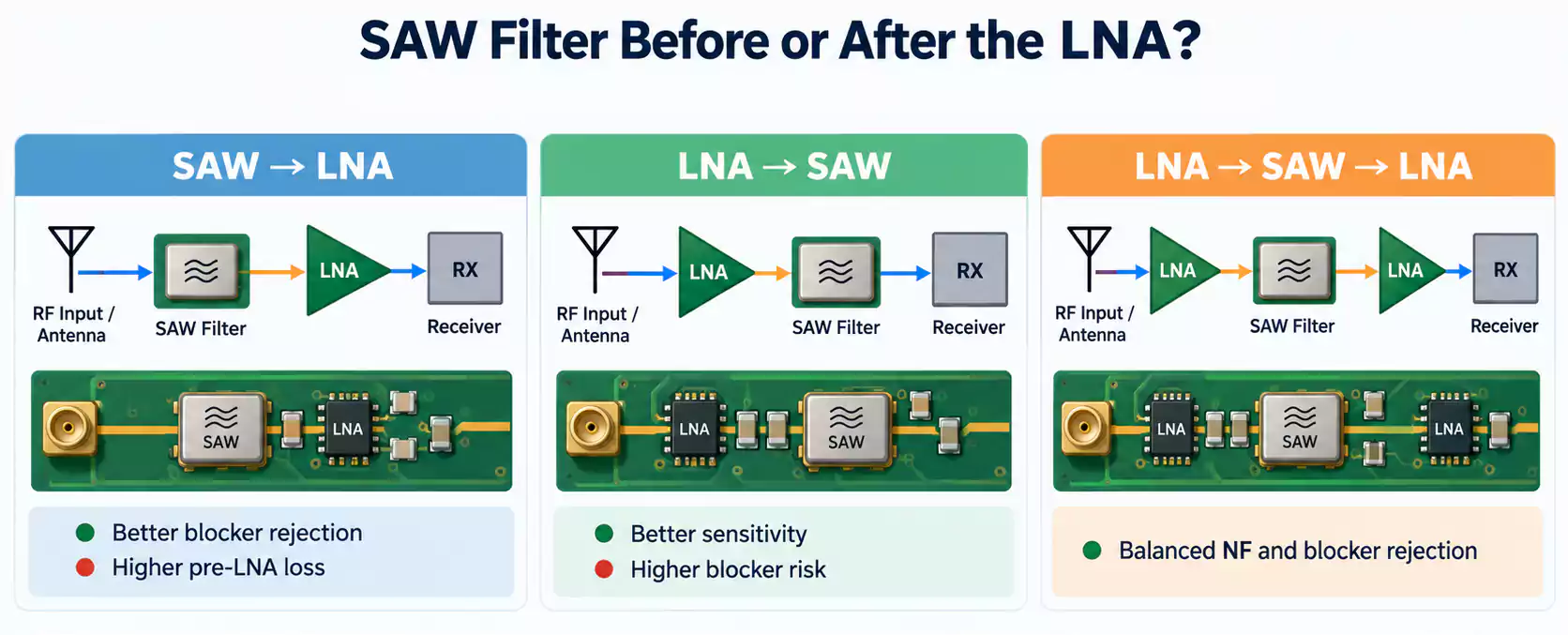
The best order depends on the receiver’s sensitivity target and blocker environment.
| Architecture | Sensitivity | Blocker Rejection | Linearity Risk |
|---|---|---|---|
| SAW → LNA | Lower | Strongest | Higher |
| LNA → SAW | Highest | Lower | Lower |
| LNA → SAW → LNA | High | Strong | Balanced |
SAW → LNA
Placing the SAW filter ahead of the LNA attenuates out-of-band signals before amplification. This helps protect the LNA from compression and intermodulation in crowded RF environments.
The main cost is insertion loss. Since the filter sits before the first gain stage, that loss directly increases the receiver noise figure.
LNA → SAW
Placing the LNA first preserves weak-signal sensitivity by adding gain before the filter loss.
This approach works well when sensitivity is the priority and blocker levels are manageable. The LNA must still provide enough IIP3 and P1dB margin to handle strong out-of-band signals.
LNA → SAW → LNA
A two-stage approach combines early gain with mid-stage filtering and additional gain afterward.
It can provide a good balance of sensitivity, blocker rejection, and total gain in high-dynamic-range receivers, with added cost, power consumption, and layout complexity.
In practice, choose the architecture based on the receiver noise budget, expected blocker levels, and required linearity. In weak-signal applications such as GNSS receiver PCB design, this tradeoff becomes especially important because front-end insertion loss and filtering directly affect receiver sensitivity.
Perfect 50Ω S11 Does Not Always Mean Minimum Noise Figure
A low S11 indicates a good impedance match, but it does not always correspond to the lowest noise figure in an LNA.
Γopt typically represents the source impedance for minimum noise. This optimum noise impedance can differ from the impedance that gives the best return loss or maximum gain.
As a result, the LNA input network may need to balance:
- noise figure
- gain
- return loss
For PCB layout, treat the matching network as part of the LNA’s noise performance, not simply as a 50Ω interface.
The real RF path includes:
LNA pin → pad → PCB trace → matching components → 50Ω line
At RF frequencies, pads and short traces add parasitic inductance and capacitance. Even small changes in matching-component placement can shift the impedance presented to the LNA and affect both S11 and noise figure.
LNA and SAW Filter PCB Layout
Keep the Signal Path Short and Linear
A typical RF front end follows a direct path:
RF Connector → Protection → SAW / LNA → Matching → LNA / SAW → Receiver
Keeping the path short and linear helps limit coupling between the amplified output and the sensitive LNA input. Folded routing can increase feedback and affect stability.
Place Matching Components Close to the Intended Reference Plane
The matching network works together with the nearby pads and traces, so placement directly affects the impedance seen by the LNA or SAW filter.
The manufacturer’s reference layout is usually the best starting point for the spacing between RF pins, matching components, and the 50Ω line. The same principle applies to antenna feed network PCB design, where matching components, transmission-line geometry, and grounding work together as one RF network.
Calculate 50Ω From the Actual Stackup
A 50Ω PCB layout should be based on the production stackup, including:
- dielectric thickness
- dielectric constant
- finished copper thickness
- trace width
- coplanar gap
For reliable controlled-impedance PCB manufacturing, these parameters should reflect the actual production stackup rather than generic FR-4 values.
Treat Pads and Footprints as Part of the RF Network
At RF frequencies, even small 0201 and 0402 footprints add parasitic inductance and capacitance.
The signal path is:
Trace → Pad → Component → Pad → Trace
Pad geometry, solder volume, and component placement can therefore shift the final RF response.
SAW Filter PCB Layout: Prevent Bypass Coupling
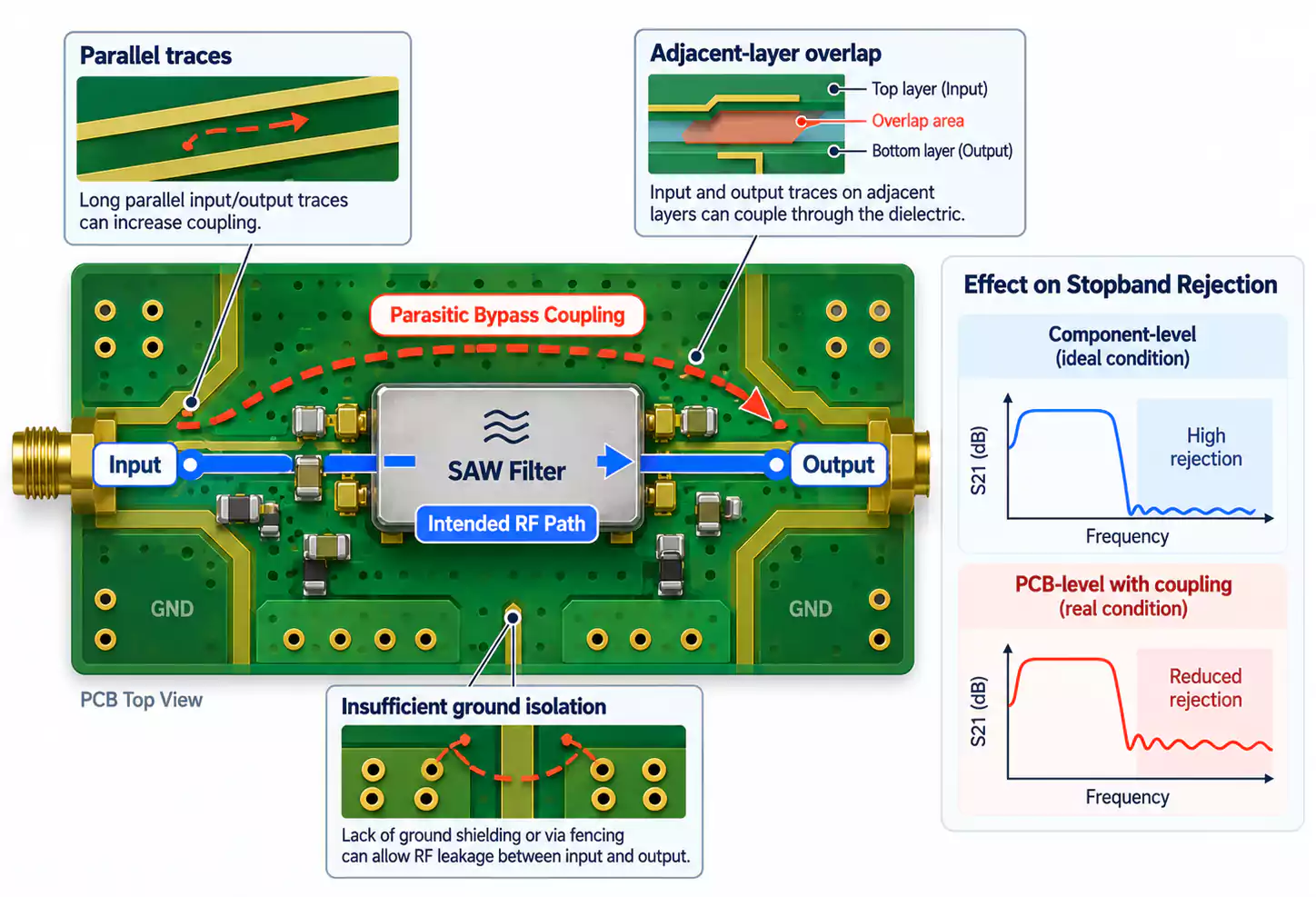
A SAW filter may have strong stopband rejection on its datasheet, but PCB-level performance can be lower when parasitic coupling creates a path around the filter.
The intended signal path is:
Input → SAW Filter → Output
An unwanted coupling path can act in parallel:
Input → Parasitic Coupling → Output
This bypass path reduces the effective stopband rejection of the assembled RF front end.
Control Input-to-Output Coupling
Good SAW filter PCB layout keeps the input and output sections physically separated.
Key layout practices include:
- short, non-parallel input and output traces
- separation between the two ports on adjacent layers
- direct signal flow through the filter
- well-grounded copper between sensitive RF regions
Grounded via fencing can provide additional isolation when the layout and frequency require it.
Follow the SAW Filter Reference Layout
Grounding around a SAW filter depends on the package and the vendor’s recommended PCB pattern.
Typical requirements may include:
- ground pads
- keepout areas
- exposed pads
- grounding vias
The manufacturer’s reference PCB is the best starting point because it reflects the electrical behavior of that specific SAW package.
Grounding for LNA and SAW Filter Layout
A continuous RF reference plane helps maintain a stable return path under the signal trace.
For critical RF routes, continuity around ground splits, slots, and large plane openings matters because these features can disrupt return current and local impedance.
For a QFN LNA with an exposed ground pad, short ground vias placed close to the device provide a low-inductance connection to the ground plane.
Top-Layer Ground Copper
Top-layer ground can improve field control when it is well connected to the main ground structure.
Poorly stitched copper may introduce unwanted resonances, disturb GCPW fields, or create additional coupling between the LNA output and input.
Design via stitching for the actual RF structure. Useful spacing depends on:
- operating frequency
- substrate height
- GCPW geometry
- required isolation
The goal is a continuous, low-inductance ground structure that supports the intended RF return path.
LNA Power and RF Protection
A clean RF signal path also depends on a quiet LNA supply.
A typical power path is:
DC/DC → Filter / Low-Noise LDO → RF Choke → Local Decoupling → LNA
Keeping switching regulators, power inductors, and high-dV/dt nodes away from the LNA input and SAW filter helps reduce conducted and radiated noise.
Select RF Chokes by Frequency Performance
Evaluate an RF choke by more than its nominal inductance.
Key parameters include:
- impedance versus frequency
- Q
- self-resonant frequency
- current rating
Near or above its self-resonant frequency, the choke may no longer behave as expected in the bias network.
Keep the Decoupling Path Low Inductance
Bypass performance depends on both the capacitor and its connection to power and ground.
Short traces, small loop area, and nearby ground vias reduce parasitic inductance and improve high-frequency decoupling.
Include ESD Protection in the RF Input Design
TVS and ESD devices add capacitance and package parasitics to the RF input.
Placing them near the external connector provides effective protection, but include their RF loading in the matching and insertion-loss analysis.
For sensitive RF inputs, a lower-capacitance protection device generally reduces its impact on S11 and signal loss.
Manufacturing and Assembly Tolerances Affect RF Performance
RF performance can shift between prototype and production as PCB and assembly tolerances change.
Key PCB variables include:
- dielectric thickness and Dk
- finished copper thickness
- trace width and GCPW gap
- solder mask
Assembly variation also matters, especially around small RF components and QFN packages.
For RF inductors and capacitors, nominal value alone is not enough. Two 3.3 nH inductors can have different Q, ESR, self-resonant frequency, and package parasitics, which can change S11, gain, insertion loss, center frequency, and stopband rejection.
Material selection should follow the actual loss budget. FR-4 may suit short, lower-frequency RF paths, while higher-frequency or longer transmission lines may benefit from a lower-loss laminate.
How to Validate an LNA + SAW RF Front End
RF validation should cover matching, gain, noise, linearity, and filter performance.
| Test | What It Reveals |
|---|---|
| S11 | Input matching |
| S21 | Gain or insertion loss |
| Noise Figure | Receiver noise performance |
| P1dB / IIP3 | Compression and linearity |
| Stopband Measurement | SAW filter rejection |
| Spectrum Check | Spurs or oscillation |
These measurements should be evaluated together. A front end can show good S11 while still having poor noise figure, or correct in-band gain while losing stopband rejection.
The test plan should therefore reflect the actual receiver requirements rather than relying on a single RF metric.
Conclusion
A reliable RF front-end PCB design depends on the right LNA/SAW architecture, accurate matching, controlled 50Ω routing, solid grounding, and effective isolation between sensitive RF nodes.
Good LNA PCB design should preserve sensitivity, selectivity, linearity, and stability from prototype through production.
MULTIPCB supports RF and high-frequency PCB fabrication and assembly for LNA, filter, antenna, and other RF front-end designs, including controlled-impedance manufacturing and prototype-to-production support.
