




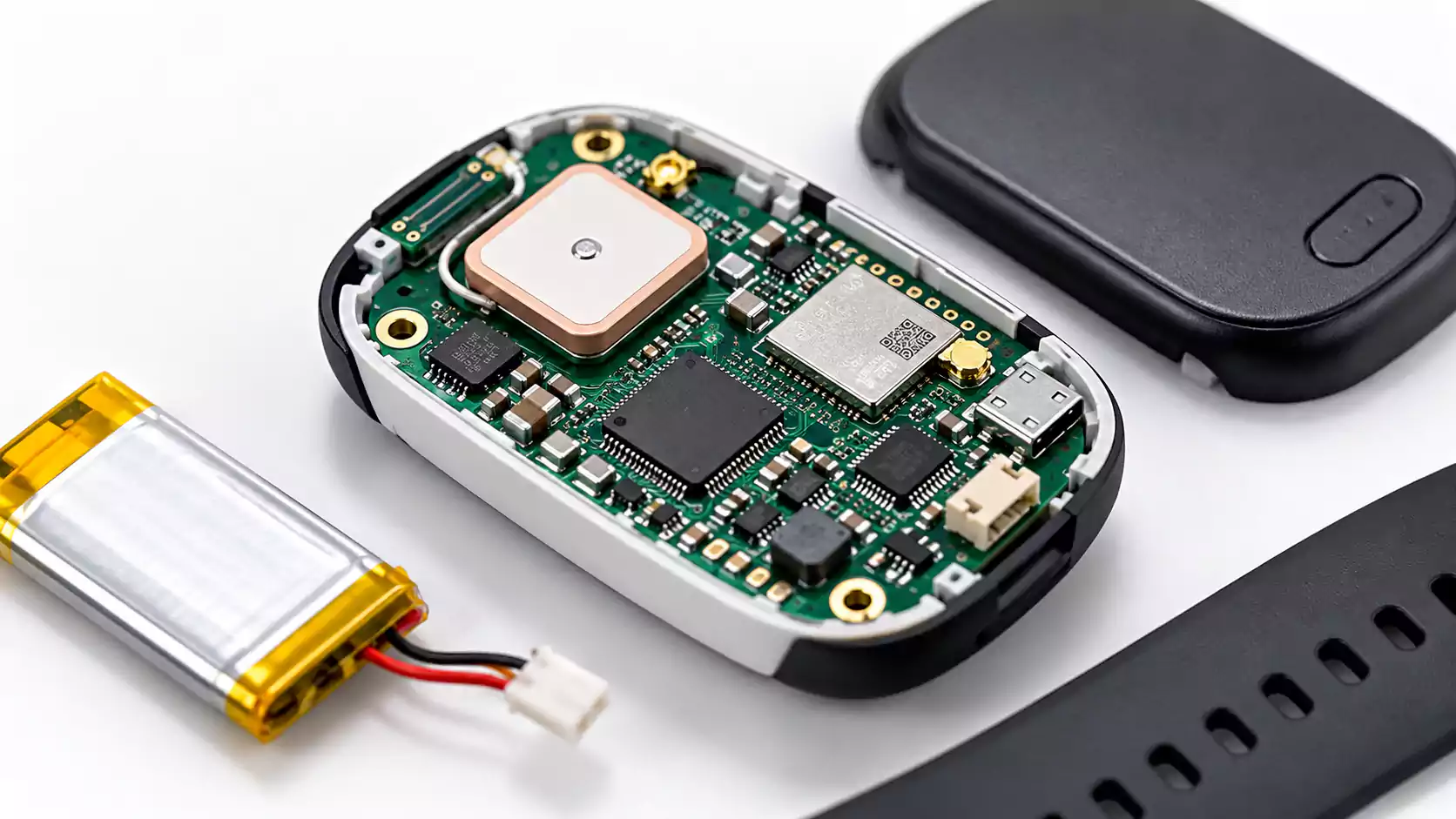

A PCB design may pass every design rule check (DRC) in CAD software but still encounter manufacturing problems. Missing drill files, incorrect layer assignments, or conflicting fabrication specifications can delay production.
PCB CAD to CAM transfers PCB design data from CAD software to a manufacturer's CAM system for verification, manufacturability review, and production preparation.
The process links design intent to fabrication requirements. It helps engineers identify data inconsistencies, resolve manufacturing issues, and prepare accurate production files.
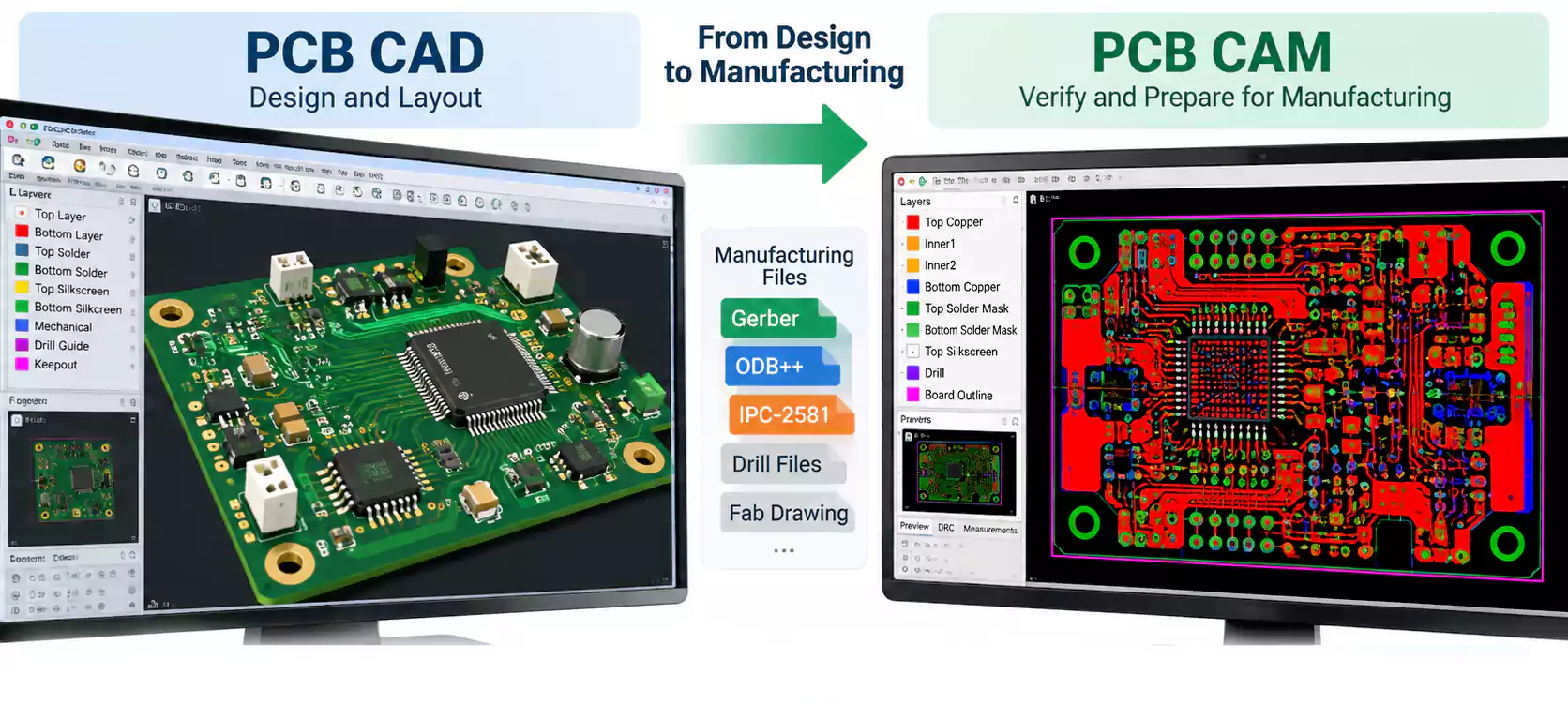
CAD vs. CAM in PCB Manufacturing
CAD (Computer-Aided Design) defines the PCB's electrical layout and physical structure. CAM (Computer-Aided Manufacturing) verifies the exported design data and prepares it for fabrication.
| PCB CAD | PCB CAM |
|---|---|
| Creates PCB layouts, traces, pads, vias, and board outlines | Verifies and prepares PCB manufacturing data |
| Performs design rule checks (DRC) | Checks manufacturing data and supports DFM review |
| Exports Gerber, ODB++, or IPC-2581 data | Prepares data for imaging, drilling, routing, and testing |
| Defines electrical and mechanical design intent | Checks compatibility with manufacturing capabilities |
The key difference: CAD checks the design against configured rules, while CAM evaluates the manufacturing data against actual fabrication requirements.
For example, trace spacing may pass CAD DRC but fall below the manufacturer's minimum clearance for the specified copper thickness.
CAM review identifies these differences before fabrication.
How Does PCB CAD-to-CAM Data Transfer Work?
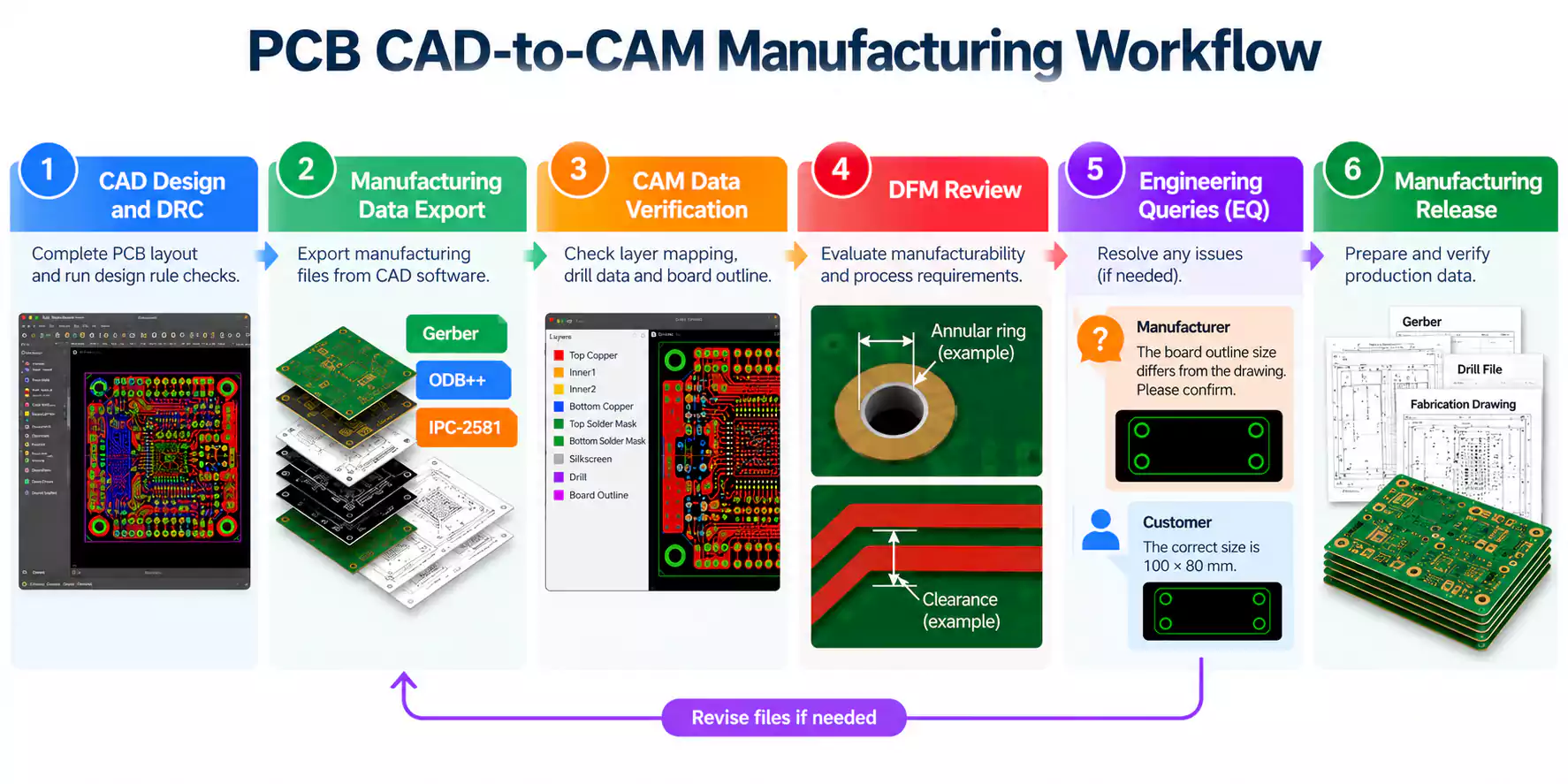
The PCB CAD-to-CAM workflow typically involves six steps:
- CAD Design and DRC: Complete the PCB layout through a structured PCB design flow and check the configured design rules.
- Manufacturing Data Export: Export Gerber, ODB++, or IPC-2581 data, along with applicable drill files and fabrication specifications.
- CAM Data Verification: Check layer mapping, board outlines, drill information, and file consistency.
- DFM Review: Evaluate manufacturing tolerances, copper clearances, hole structures, and special fabrication requirements.
- Engineering Queries (EQ): Clarify conflicting specifications or manufacturing issues requiring customer confirmation.
- Manufacturing Release: Prepare and verify production data for imaging, drilling, routing, and electrical testing.
For multilayer and HDI PCBs, additional checks may include stackup verification, microvia structures, and sequential lamination requirements.
The result is a verified manufacturing data package that reflects the approved PCB design and the selected fabrication process.
What Files Are Required for PCB CAD-to-CAM Transfer?
A complete PCB manufacturing data package communicates the physical layout, manufacturing specifications, and any special requirements.
| File | Purpose | Key Checks |
|---|---|---|
| Gerber / ODB++ / IPC-2581 | PCB manufacturing data | Layer completeness and identification |
| NC Drill Files | Hole locations and sizes | Hole dimensions and PTH/NPTH definitions |
| Fabrication Drawing | Board dimensions and specifications | Thickness, tolerances, and surface finish |
| PCB Stackup | Layer construction | Layer order, materials, and copper thickness |
| Impedance Requirements | Controlled impedance specifications | Target impedance, layers, and tolerances |
| BOM / Pick-and-Place | PCB assembly data, when required | Component identification, placement, and orientation |
Gerber vs. ODB++ vs. IPC-2581
Gerber is widely used to transfer PCB manufacturing artwork, including copper, solder mask, and legend layers. Depending on the data package, drilling information and fabrication specifications may be supplied separately or through supported accompanying data.
For more information on Gerber formats, viewers, and file validation, see our Gerber file guide.
ODB++ supports structured manufacturing data exchange, while the IPC-2581 standard provides an open format for transferring PCB design and manufacturing information.
For example, Gerber X2 supports attributes that identify layer functions and PCB features, helping CAM software interpret design intent.
The appropriate format depends on the CAD export capabilities and the manufacturer's supported CAM workflow.
Why Fabrication Drawings Matter
Fabrication drawings communicate requirements that may not be fully defined by the PCB artwork:
- Finished board thickness and dimensional tolerances
- Finished hole sizes and tolerances
- Surface finish and solder mask specifications
- Materials and copper thickness requirements
- Controlled impedance and special manufacturing notes
All manufacturing files should match the approved design revision.
Consistent documentation helps engineers interpret the design accurately and reduces the need for clarification.
What Do CAM Engineers Check Before PCB Fabrication?
A PCB CAM review verifies whether the submitted manufacturing data is complete, consistent, and compatible with the manufacturer's processes.
| CAM Check | What Engineers Verify | Potential Risk |
|---|---|---|
| Layer Mapping | Copper layer sequence and identification | Incorrect layer construction |
| Board Outline | Dimensions, cutouts, and routing geometry | Incorrect finished dimensions |
| Drill Data | Hole sizes, positions, and plating requirements | Drilling and plating defects |
| Annular Ring | Copper remaining around drilled holes | Insufficient connection margin |
| Copper Clearance | Spacing between conductive features | Short circuits or etching defects |
| Solder Mask | Pad openings and solder mask bridges | Exposed copper or soldering problems |
| Stackup & Impedance | Materials, dielectric thickness, and copper thickness | Stackup or impedance deviations |
| HDI & Microvias | Via structures and layer connections | Manufacturing or reliability risks |
Why Can a PCB Pass DRC but Fail CAM or DFM Checks?
CAD DRC checks the layout against rules configured in the design software. CAM and DFM reviews also consider manufacturing capabilities, process tolerances, and production methods.
For example, an annular ring must provide sufficient copper around a drilled hole while accounting for drill registration tolerances.
Similarly, finished hole diameter and drill tool diameter are different manufacturing parameters. Plated through-holes generally require an initial drill diameter larger than the specified finished hole to account for copper plating.
For controlled impedance PCBs, engineers also review whether the proposed stackup and conductor geometry meet the specified impedance requirements.
These checks help identify manufacturability risks that may not appear during CAD DRC.
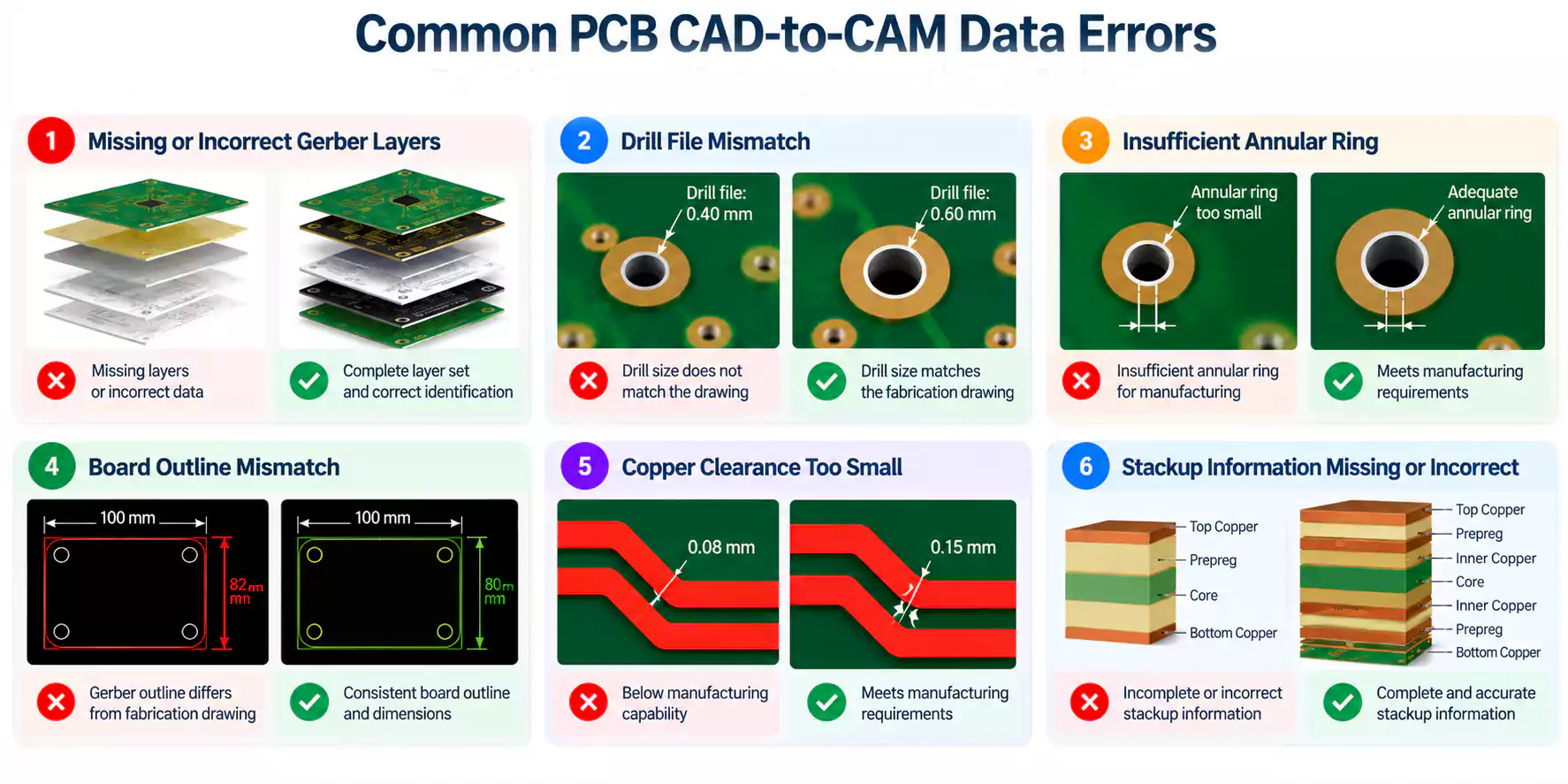
Common PCB CAD-to-CAM Data Errors and Solutions
Several common issues can interrupt the transition from design to manufacturing.
| Common Problem | Manufacturing Impact | Recommended Solution |
|---|---|---|
| Missing Gerber layers | Incomplete manufacturing artwork | Re-export and verify the complete layer set |
| Drill file mismatch | Incorrect hole dimensions or locations | Compare drill data with fabrication drawings |
| Board outline conflict | Uncertain finished dimensions | Confirm the approved board outline |
| Insufficient annular ring | Reduced manufacturing margin | Review pad and drill geometry with the manufacturer |
| Stackup inconsistency | Incorrect construction or impedance | Confirm the stackup before production |
| Incorrect design revision | Wrong design version manufactured | Submit one consistent, approved revision |
What Is a CAM Hold?
A CAM hold temporarily pauses PCB manufacturing preparation because of unresolved design data or engineering questions.
Common causes include missing files, conflicting dimensions, unsupported manufacturing features, and unclear specifications.
For example, a fabrication drawing may specify a 1.6 mm board thickness while the submitted stackup specifies 1.2 mm.
The CAM engineer must confirm the intended construction before releasing the manufacturing data.
Resolving these inconsistencies early helps reduce engineering queries and protects the production schedule.
Engineering Queries: How CAD and CAM Engineers Resolve Issues
An Engineering Query (EQ) is a request from the PCB manufacturer to clarify missing, conflicting, or potentially unmanufacturable design information.
An EQ typically identifies the problem, explains its manufacturing impact, and requests customer confirmation or revised data.
Example: Board Outline Mismatch
Consider the following illustrative example:
| Submitted Data | Board Dimensions |
|---|---|
| Fabrication Drawing | 100 × 80 mm |
| Gerber Board Outline | 100 × 82 mm |
The CAM engineer identifies the discrepancy and asks the customer to confirm the intended board dimensions.
The customer confirms the correct size and, if needed, provides updated files. The CAM engineer then verifies the approved data before releasing it for manufacturing.
This process ensures that fabrication follows the intended specifications.
Who Approves Design Changes?
CAM engineers may apply controlled manufacturing adjustments, such as process compensation, within the agreed specifications.
Changes affecting electrical connectivity, mechanical fit, critical dimensions, or functional requirements generally require approval from the design owner.
Documenting engineering queries, customer responses, and approved revisions helps keep design intent consistent with manufacturing data.
PCB CAD-to-CAM Handoff Checklist
Before submitting PCB files for manufacturing, verify the following: Complete
- CAD design and DRC checks.
- Gerber, ODB++, or IPC-2581 data is complete and verified.
- Drill data, layer mapping, and board outline are accurate.
- Fabrication drawings match the manufacturing files.
- Stackup, impedance, and special manufacturing requirements are specified.
- BOM and Pick-and-Place files are included for PCBA projects.
- All files match the approved design revision.
A complete, consistent data package helps reduce engineering queries and manufacturing delays.
Frequently Asked Questions
How do CAD and CAM work together in PCB manufacturing?
CAD defines the PCB layout and design requirements. CAM verifies the exported data, checks manufacturing constraints, and prepares production information. Engineering queries connect both processes when clarification is needed.
How do you convert PCB CAD files into manufacturing data?
Export Gerber, ODB++, or IPC-2581 files from the PCB design software, together with the required drill data and fabrication specifications. The manufacturer then verifies and processes the data through its CAM workflow.
Why can a PCB pass DRC but fail CAM or DFM checks?
DRC checks configured design rules, while CAM and DFM reviews evaluate actual fabrication capabilities and tolerances. Issues involving copper spacing, drill registration, annular rings, or stackup requirements may require additional review.
Conclusion
Effective PCB CAD-to-CAM communication ensures design intent transfers accurately into manufacturing data. Complete files, careful CAM review, and timely engineering clarification help reduce production errors and delays.
MULTI PCB provides multilayer PCB, HDI PCB, and PCB assembly services, with engineering support for manufacturing data review. Contact our team with your design files for a DFM review and quotation.
